
Mobile Audio Convert ActiveX1.0 - Download
You'll be able to download in few seconds.
Publisher Description
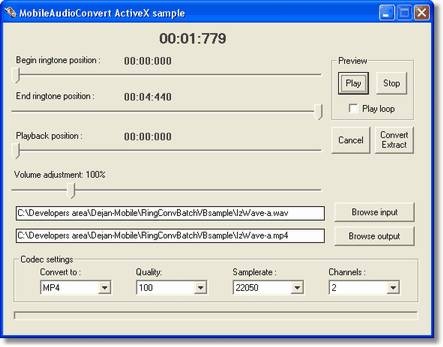
Ready to use solution for developers who want to make wide popular mobile ringtone utility software. With Mobile Audio Convert ActiveX Control developers can easily design and build applications which create and extract ring tones from existing music. You can also convert music between the most popular, contemporary mobile-audio formats: Mp3, Mp4, AAC, AMR-NB, MMF, WMA, Ogg Vorbis and Wave. Wide choice of bitrate, samplerate and channel settings are provided for all conversion output results.
Control also has an option to convert or save only specified portion of audio, making it usefull for ringtone extraction, or building audio file splitting features. It has improved volume changing capability that overrides appearance of result audio clipping. Control has advanced preview playback methods, enabling easy, quick and accurate ring tone extraction.
Developers have means to determine if all redistributables required for particular audio format conversion are installed on users computer and perform appropriate actions. Respectively, they can make more compact installations if some of supported audio formats are not needed in particular program.
You can insert AudioFileConvert ActiveX Control in your program, which supports ActiveX controls, such as Visual Basic, Visual C++, Delphi, C++ Builder, Visual FoxPro and others.
About Mobile Audio Convert ActiveX
This Active X program is available in English. It was last updated on 29 September, 2026. Mobile Audio Convert ActiveX is compatible with the following operating systems: Windows.
The company that develops Mobile Audio Convert ActiveX is Pianosoft. The latest version released by its developer is 1.0.
The download we have available for Mobile Audio Convert ActiveX has a file size of 5.2 MB. Just click the green Download button above to start the downloading process. The program is listed on our website since 2008-05-08 and was downloaded 0 times. We have already checked if the download link is safe, however for your own protection we recommend that you scan the downloaded software with your antivirus. Your antivirus may detect the Mobile Audio Convert ActiveX as malware if the download link is broken.
How to install Mobile Audio Convert ActiveX on your Windows device:
- Click on the Download button on our website. This will start the download from the website of the developer.
- Once the Mobile Audio Convert ActiveX is downloaded click on it to start the setup process (assuming you are on a desktop computer).
- When the installation is finished you should be able to see and run the program.
Program Details
System requirements
Download information
Pricing
Version History
version 1.0
posted on 2008-05-08
Disclaimer
External Download
We do not host Mobile Audio Convert ActiveX on our servers. We did not scan it for viruses, adware, spyware or other type of malware. This app is hosted by the software publisher and passed their terms and conditions to be listed there. We recommend caution when installing it.
The external download link for Mobile Audio Convert ActiveX is provided to you by apps112.com without any warranties, representations or guarantees of any kind, so access it at your own risk.
If you have questions regarding this particular app contact the publisher directly. For questions about the functionalities of apps112.com contact us.
